

Best Slack Coding Assistants in 2026
Boost developer productivity with async coding agents. Learn how Tembo automates multi-repo tasks, enforces standards, and speeds up software delivery.

Your team already lives in Slack. Standups, incident threads, design discussions, deployment alerts. The one thing missing from that workflow has been the ability to actually write and ship code without switching to a separate tool. That gap is closing fast. A new category of AI coding assistants now operates directly inside Slack, letting developers tag an agent in a channel, describe a task in plain English, and get a pull request back in the same thread.
This is not about chatbots that answer coding questions. Slack coding assistants are autonomous agents that read your codebase, generate real code changes, open PRs, and iterate on feedback. They turn Slack from a communication tool into an operational hub where code gets shipped. This guide covers what these tools actually do, compares the best options available right now, and helps you decide which one fits your team's workflow.
What Is a Slack Coding Assistant?
A Slack coding assistant is an AI-powered agent that integrates directly with your Slack workspace to handle coding tasks. You mention the agent in a channel or DM, describe what you need, and it works autonomously: reading your repository, analyzing the problem, generating code, and submitting changes through your existing Git workflow.
The difference from a general-purpose chatbot is execution. A Slack coding assistant does not just suggest code snippets in a message. It connects to your repositories (GitHub, GitLab, Bitbucket), runs in an isolated environment with full access to your codebase, and delivers its output as a pull request you can review and merge. The agent understands thread context, so if your team has been discussing a bug in a Slack thread for 10 minutes, you can tag the agent, and it will pick up the full conversation history as input.
Tembo is one example of how this works in practice. You type @Tembo Fix the authentication bug in the login flow in any Slack channel, and the agent reads your codebase, identifies the issue, generates a fix, and opens a PR. It even posts status updates back to the original Slack thread with emoji reactions (hourglass while working, checkmark when done) and links to the finished PR.
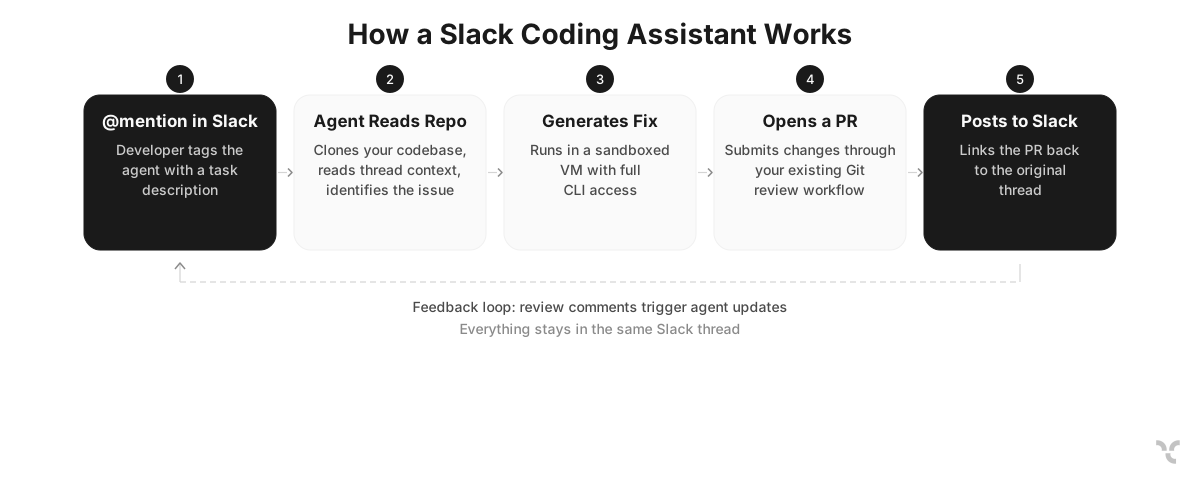
The underlying technology varies by tool, but most Slack coding assistants share a common architecture. A Slack app listens for mentions. A backend clones and analyzes your repository. An AI model (Claude, GPT, or others) generates code. An integration with your Git provider submits changes as a PR. The key innovation is making all of this accessible from a single @mention in the tool your team already uses every day.
Why Use a Coding Assistant in Slack?
The core argument is context switching. A 2022 study from the University of California, Irvine found that it takes an average of 23 minutes to return to a task after an interruption. Every time a developer leaves Slack to open an IDE, pull down a branch, investigate a bug, write a fix, push, and create a PR, that is a context switch. Multiply that by the number of small tasks that come up in Slack threads daily: quick fixes, test additions, documentation updates, dependency bumps. The cumulative cost is significant.
Slack coding assistants eliminate that switch for a specific category of work. When someone reports a bug in #engineering, a developer can tag the coding agent right there instead of mentally queuing the task for later. The agent handles investigation and fix generation while the developer stays focused on their current work. The PR shows up in the same thread, ready for review.
Three specific advantages over IDE-based coding assistants:
- Team visibility. When an agent works inside Slack, the entire team sees the task, the progress, and the result. A bug fix triggered from a thread creates a shared context that is lost when one developer silently fixes something in their local IDE. With Tembo's Slack integration, the completed PR links back to the original Slack thread, so anyone following the conversation can see exactly what changed and why.
- Non-developers can trigger work. Product managers, QA engineers, and support staff can describe issues in Slack and tag the coding agent. They do not need to file a Jira ticket, write a detailed bug report, or know which repository is affected. The agent handles the translation from a natural language problem description to a code change.
- Asynchronous by default. Slack coding assistants run in the background. You tag the agent and move on. The PR appears when it is ready, whether that takes two minutes or twenty. This matches how background coding agents work: they optimize for quality over speed because nobody is sitting there watching a cursor blink.
Best Slack Coding Assistants in 2026
Tembo
Tembo is built around a simple premise: coding agents should work where your team already communicates. Slack is its primary interface, and the entire product is designed so that a developer (or anyone on the team) can describe a task in a Slack channel and get a production-ready PR back in the same thread.
How it works in Slack: Type @Tembo [task description] in any channel or DM. The agent reads the full thread context, connects to your configured repositories, and generates a PR. For multi-repo tasks, you can specify targets: @Tembo [repo=frontend,backend] Add CORS headers to the API and update the client configuration. Advanced options let you choose which base branch to target and which underlying AI model to use (Claude Code, Codex, Cursor, Amp, or Opencode).
Here are a few examples of what teams are doing with Tembo and Slack:
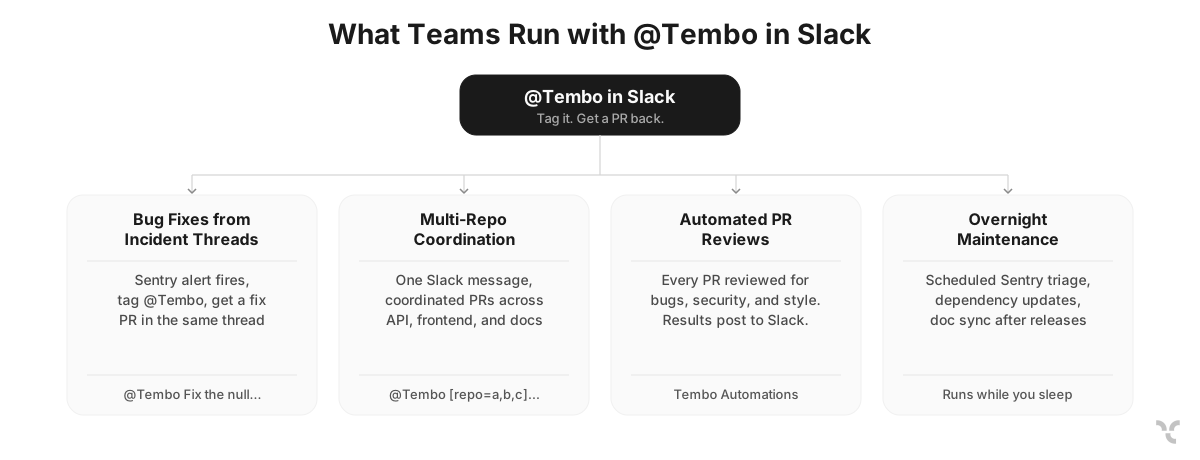
Bug triage from incident threads. A Sentry alert fires and lands in #production-alerts. Someone tags @Tembo Fix the null pointer exception in the payment processing flow. The agent reads the error trace, finds the root cause in your codebase, generates a fix, and opens a PR. Status updates appear in the thread as emoji reactions: hourglass while working, checkmark when done. The engineer on-call reviews and merges without ever opening an IDE.
Multi-repo changes from a single message. Full-stack features often touch multiple repositories. With Tembo, you write one Slack message: @Tembo [repo=api,frontend,docs] Add rate limiting to the /users endpoint, update the client to handle 429 responses, and document the new limits. The agent creates coordinated PRs across all three repos and links them back to the same Slack thread.
Automated PR reviews on every pull request. Set up a Tembo Automation that triggers on every PR open event. The agent reviews for bugs, security vulnerabilities, performance regressions, and style violations, then leaves inline comments on the PR. Results are posted back to a Slack channel so the team has visibility into what the reviewer caught.
Overnight Sentry error triage. Configure a daily automation that checks Sentry at 8 AM, ranks errors by affected users, posts the top three to #engineering-bugs in Slack, creates Linear tickets for each, and generates fix PRs for the ones it can solve autonomously. By the time your team starts their day, the work is already done.
What sets it apart: Tembo is agent-agnostic. Unlike tools locked to a single AI provider, Tembo lets you choose between Claude Code (Anthropic), Codex (OpenAI), Cursor, and others. You are not locked into one vendor's model quality or pricing. The agent runs in a sandboxed VM with full CLI access, meaning it can execute code, run your test suite, and call any MCP server your team has configured. This is not just code generation. It is full execution with access to your codebase, documents, integrations, and MCP servers.
Feedback loop: When you review the PR on GitHub and leave comments mentioning @Tembo, the agent processes your feedback and updates the PR. It then posts a notification back to the original Slack thread with "View Updated PR" and "View on Tembo" buttons. This creates a cycle between Slack and GitHub where the agent iterates until the code is ready to merge.
Pricing: Free includes a $10 one-time usage allowance on one repository. Pro is $60/month with a $60 monthly allowance and unlimited repos. Max is $200/month with a $200 monthly allowance. The allowance covers managed inference and cloud VM compute. Self-hosted plans include self-hosted deployment behind your VPC, SSO, BYOK (bring your own API keys), and dedicated support.
Other Slack Coding Assistants
Several other tools offer Slack integrations for coding tasks, each with a different focus.
Autohand AI focuses on incident response and debugging. It connects to GitHub, GitLab, Jira, Linear, PagerDuty, Datadog, and Sentry, and handles root cause analysis and suggested fixes directly in Slack threads. Available on Team and Enterprise plans. The limitation compared to Tembo is that it lacks multi-repo coordination, agent-agnostic model selection, and event-driven automations.
GitHub Copilot Coding Agent is available in Slack through the GitHub app integration (public preview since October 2025). You mention @GitHub in a thread, and the agent works asynchronously to open a draft PR. Its strength is tight coupling with GitHub's issue and PR workflow. The limitation is that it only works with GitHub (not GitLab or Bitbucket), requires a paid Copilot plan, and does not support scheduled automations or multi-repo changes.
Claude Code for Slack (Anthropic) detects coding tasks in Slack messages and routes them to a Claude Code session. It is included in existing Claude subscriptions at no extra cost. However, the Slack connector requires a Team or Enterprise plan, and the feature is currently in beta. It routes work to an external environment rather than keeping the full workflow inside Slack.
Vercel v0 is designed for real-time UI prototyping in Slack threads rather than autonomous coding. Best suited for front-end teams building with Next.js who want to iterate on components collaboratively. Not designed for bug fixing, PR automation, or multi-repo backend work.
Slack's native AI includes channel summarization, action extraction, and a growing agent marketplace. The marketplace hosts agents like Codex and Cursor, but each requires separate configuration. This modular approach gives flexibility at the cost of having a unified workflow across triggers, automations, and feedback loops.
How to Choose the Right Slack Coding Assistant
Most teams evaluating Slack coding assistants are looking for a tool that handles the full workflow: trigger a task from Slack, get a PR back in the same thread, and iterate on feedback without switching tools. Here is how to think about what you need.
Do you need more than chat? If you just want to ask coding questions in Slack, Claude Code for Slack works fine and is included in existing Claude subscriptions. But if you need the agent to actually write code, open PRs, and run in the background, you need a dedicated Slack coding agent like Tembo.
Do you work across multiple repositories? Most Slack coding tools operate on a single repo at a time. Tembo handles multi-repo coordination in a single Slack message, creating linked PRs across your API, frontend, and documentation repositories from one @Tembo mention.
Do you want coding agents running without anyone triggering them? If your team wants agents that respond to Sentry errors at 3 AM, review every PR automatically, or scan for security vulnerabilities on a daily schedule, you need Tembo Automations. None of the other Slack coding assistants offer this kind of event-driven, scheduled agent execution.
Are you locked into one AI provider? GitHub Copilot only uses GitHub's models. Claude Code only uses Claude. Tembo lets you choose between Claude Code, Codex, Cursor, Amp, and Opencode per task. If a new model comes out that is better for your use case, you switch without changing your workflow.
Slack Coding Assistants vs IDE-Based Coding Assistants
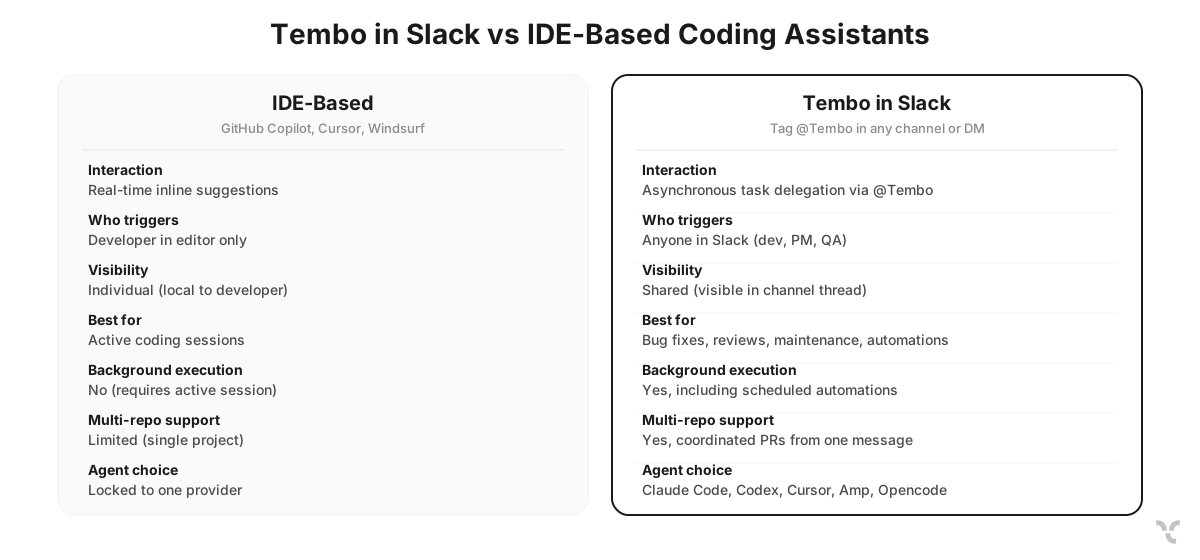
The question is not “which is better?”, but “which is better for what?”
IDE-based assistants (GitHub Copilot, Cursor, Windsurf) excel at inline code completion, real-time suggestions while you type, and interactive pair programming sessions. They sit in your editor and help you write code faster as you work. The developer is always in the loop, guiding the AI line by line.
Slack-based coding assistants excel at asynchronous, delegated work. You describe a task in natural language and walk away. The agent handles investigation, implementation, and PR creation independently. You review the output when it is ready. This is a fundamentally different interaction model: delegation instead of collaboration.
| Dimension | IDE-Based (Copilot, Cursor) | Tembo in Slack |
|---|---|---|
| Interaction model | Real-time, inline suggestions | Asynchronous, task delegation via @Tembo |
| Who triggers work | Developer in editor | Anyone in Slack (dev, PM, QA) |
| Team visibility | Individual (local to developer) | Shared (visible in channel thread) |
| Best for | Active coding sessions | Bug fixes, PR reviews, maintenance, automations |
| Background execution | No (requires active session) | Yes, including scheduled automations |
| Multi-repo support | Limited (single project context) | Yes, coordinated PRs from one message |
| Agent choice | Locked to one provider | Claude Code, Codex, Cursor, Amp, Opencode |
The strongest setup for most teams is both. Use an IDE assistant for active development sessions and Tembo in Slack for everything that comes up in team conversations: bug reports, incident threads, PR reviews, and the maintenance tasks that pile up when engineers are focused on roadmap work. An engineer might use Cursor for focused feature work and @Tembo for the bug that gets reported in #production-alerts while they are deep in that feature branch.
Conclusion
Slack coding assistants are moving AI pair programming from the editor into the team communication layer. The tools covered here range from Slack-native agents that handle full PR workflows to lighter integrations that route tasks to external environments. The right choice depends on whether your team needs deep Slack integration with background automations, tight coupling with a specific Git provider, or lightweight coding help added to an existing AI subscription.
If you want to evaluate this approach, Tembo's free tier includes a $10 one-time usage allowance with no credit card required. Set it up in your team's Slack workspace, connect a repository, and tag @Tembo on the next bug that shows up in a channel thread. Compare the experience of getting a PR back in the same Slack thread against your current workflow of creating a ticket, assigning it, and waiting for a developer to context-switch into the fix.
Run any coding agent in the cloud
Tembo agents execute tasks in secure cloud environments and return reviewable output. Use any agent or model, run in parallel, and keep humans in control.


