
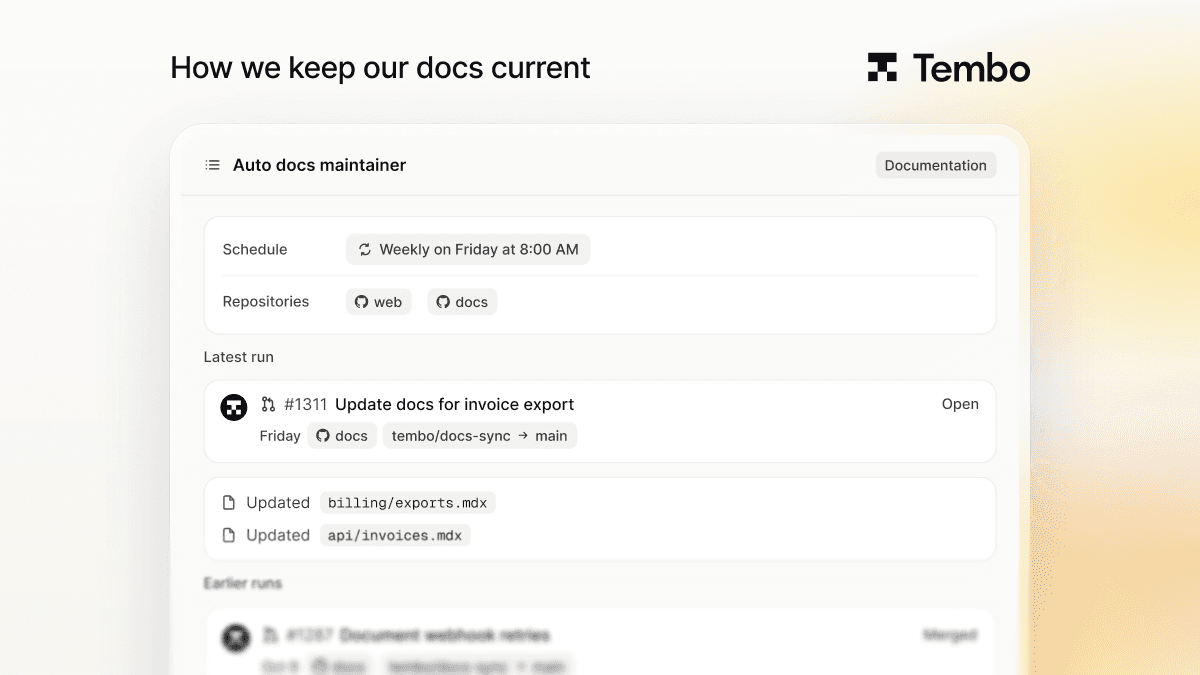
How to Keep Your Docs Up to Date Automatically
Docs fall behind because updating them is nobody's job after a merge. Here's how a scheduled Tembo agent reads what changed and opens a docs PR for your review.

The simplest way to keep docs up to date automatically is to give the job to an agent. In Tembo, a scheduled agent runs in the cloud, reads what changed in your code since its last run, and opens a pull request against your docs. Someone on your team reviews and merges it like any other PR.
That's how we keep our own docs current, and you can set up the same thing from a template.
Why do docs fall behind?
Not because anyone thinks docs don't matter. They fall behind because updating them is nobody's job right after a merge. The engineer who shipped the change has moved on to the next ticket, and the person who owns the docs often doesn't know the change happened.
So the drift is small and constant: a renamed flag, a new config option, an endpoint that now returns one more field. None of it is worth a meeting. All of it adds up.
How does a docs agent work?
A docs agent does the part nobody gets to:
- It starts on a trigger. Either on a schedule, such as once a week, or when something happens, such as a pull request being merged.
- It reads what changed. The agent works through the merged changes since its last run and picks out the ones that affect how people use your product.
- It updates the docs. It edits the affected pages in your docs repo, in your docs' existing style.
- It opens a pull request. The description says what changed in the code and which pages it updated. If nothing user-facing changed, it says so instead of inventing edits.
Every run happens in a sandbox in the cloud, with the full codebase available. Nobody's laptop has to be on, and nobody has to remember.
How do I set one up in Tembo?
- In the Tembo dashboard, go to Agents and click Templates.
- Pick Update docs automatically when your code changes and click Use template.
- Customize the instructions: which repos hold your code, which repo holds your docs, and what counts as a user-facing change.
- Choose when it runs: a schedule, or an event such as a PR merged on GitHub or a merge request merged on GitLab.
- Enable it.
Each agent has its own instructions, triggers, and choice of coding agent and model, so you can run it on Claude Code, Codex, or another harness Tembo supports.
What should the instructions say?
The template gives you a starting point. These are the parts worth making specific:
- Scope. Name the changes that matter: public API, configuration, CLI flags, UI labels, defaults. Internal refactors don't need docs.
- Where things live. Point it at the docs repo and the folders it may edit, and say which pages it should never touch.
- Style. Link your style guide, or describe it in a few lines: tense, voice, how code samples are formatted.
- One PR per run. A single reviewable PR beats a stream of small ones. Ask it to link the code changes it read, so reviewers can check each edit against its source.
- Permission to do nothing. Tell it that "nothing to change" is a valid result. It keeps the agent from padding PRs with cosmetic edits.
Should it run on a schedule or on every merge?
Both work. A weekly schedule batches changes into one PR, which is easier to review and fits a team that reviews docs once a week. Triggering on every merge keeps docs fresher but means more, smaller PRs.
We run ours weekly. On Friday it reads the week's changes and opens one docs PR, and we review it like any other PR. Some weeks "nothing to change" is the right result, and that's fine too.
FAQ
Can an AI agent update documentation automatically? Yes. A docs agent reads recent code changes, updates the affected docs pages, and opens a pull request. In Tembo it runs in the cloud on a schedule or a trigger, so it doesn't depend on anyone remembering.
Does the docs agent merge its own changes? No. It opens a pull request, and merging stays with your team, the same as any other change.
Does it work with GitLab and Bitbucket? Tembo connects to GitHub, GitLab, and Bitbucket. Event triggers cover GitHub pull requests and GitLab merge requests, and schedules work with any of them.
Which coding agent does it use? You choose per agent. Tembo supports harnesses including Claude Code, Codex, Cursor, Opencode, and Amp, and you can pick the model for each.
Try it
Start from the docs agent template, point it at your repos, and turn it on. For other things agents can run on a schedule or a trigger, see Introducing Tembo Automations, and for a wider look at the tooling, Best AI Code Documentation Generators.
Run any coding agent in the cloud
Tembo agents execute tasks in secure cloud environments and return reviewable output. Use any agent or model, run in parallel, and keep humans in control.


