Use Neon AI Gateway With Your Coding Agents
Neon AI Gateway gives you one credential and one bill across model providers. Here's how to use it to run your team's coding agents in the cloud with Tembo.

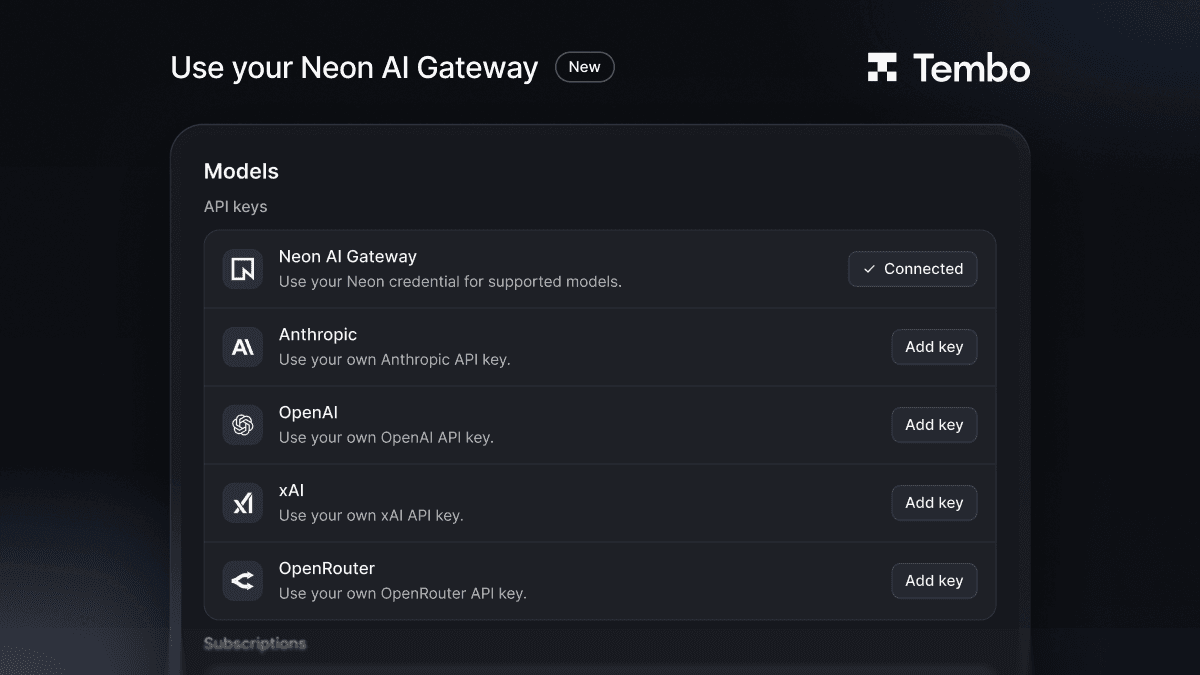
You can now use Neon AI Gateway in Tembo. Add your Neon credential under Models, and your team's coding agents run in the cloud on the models it serves, with usage billed to the Neon account you already have. No new provider key to issue, and no separate bill to reconcile.
What is Neon AI Gateway?
Neon AI Gateway is an LLM gateway built into your Neon project. One Neon credential gives you access to models from Anthropic, OpenAI, Google, xAI, and others, through APIs compatible with the standard SDKs. Usage is paid from your Neon credits at provider list prices.
It's currently in private preview on Neon's side, so check Neon's docs for access and current terms.
Why use it for coding agents?
Teams running coding agents usually end up with a key per provider: one for Anthropic, one for OpenAI, maybe one for an open-weight host. Each key needs issuing, rotating, and a budget someone watches.
A gateway collapses that into one credential:
- One key to manage. Rotate it in one place, and every agent picks up the change.
- One bill. Agent spend sits next to the rest of your Neon usage instead of across several provider invoices.
- Model choice stays open. Switching an agent to a different model doesn't mean setting up another provider account.
Tembo already supports bringing your own keys for Anthropic, OpenAI, xAI, OpenRouter, and others. Neon AI Gateway is one more option in the same list.
How do I set it up in Tembo?
- Get a credential from your Neon project, following Neon's AI Gateway docs.
- In Tembo, open Settings → Models.
- Under API keys, find Neon AI Gateway and add your credential.
- Start a session or an agent as usual and pick the model you want.
Agents still run the same way: in a sandbox in the cloud, with your repositories, opening pull requests your team reviews. Only the source of model access changes.
FAQ
Can I use Neon AI Gateway with Tembo? Yes. Add your Neon credential under Models in Tembo's settings, and your coding agents can use it for model access.
What does Neon AI Gateway cost? Neon bills usage from prepaid credits at provider list prices and requires a paid Neon plan. Check Neon's docs for current terms while it's in preview.
Do I need separate Anthropic or OpenAI keys? Not for the models you use through the gateway. You can still add provider keys alongside it if you want some agents to use them directly.
Where do the agents run? In Tembo's cloud sandboxes, the same as with any other model source. The gateway only changes where model calls are billed and authenticated.
Get started
If you already use Neon, add the gateway under Models in Tembo and start a session. For everything else you can connect, see the integrations docs.
Run any coding agent in the cloud
Tembo agents execute tasks in secure cloud environments and return reviewable output. Use any agent or model, run in parallel, and keep humans in control.